
Appearance
GameMode Pipeline
GameModeBase is the server-side coordinator for one gameplay world. It decides who may join, creates the player's controller, chooses a spawn point, creates the character, and owns the replicated match state. Put exactly one game mode actor in each gameplay scene that can run with state authority.
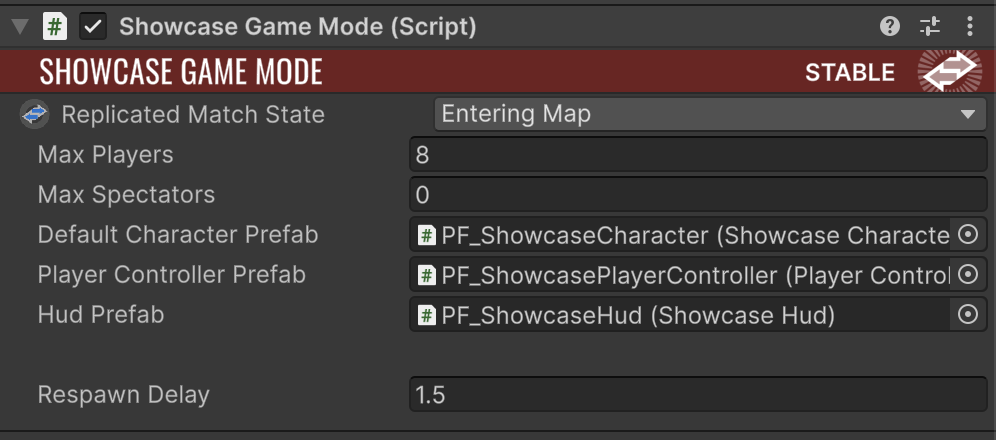
What belongs in a game mode
Use the game mode for rules that describe the session rather than one character:
- player and spectator limits;
- authentication or session admission;
- controller and default-character selection;
- team assignment or other authorization payloads;
- spawn-point selection and respawn policy;
- match start, end, abort, and map-leave transitions.
Do not use it as a global singleton. A game mode belongs to a World, exists only for that world, and is authoritative only on the server or single-player runner.
Configure the scene and prefabs
Before writing a subclass, make the base pipeline work:
- add one
GameModeBaseactor with aNetworkObjectto the main gameplay scene; - set Max Players and Max Spectators;
- assign a
PlayerControllerprefab and, for non-spectators, aCharacterprefab; - make both prefabs Fusion spawnable and keep their
NetworkObjectcomponents; - place one or more
PlayerStartactors in the scene; - include the scene in the active Build Profile and Fusion scene configuration.
The authoritative World rejects initialization when it cannot find a game mode. If it finds more than one, it logs the extra actors and uses the first. Additive levels belong to the existing world and must not contain another game mode.
Start with GameModeBase itself when every player uses the same controller and character. Subclass it only for a rule you actually need to replace: admission, team assignment, spawning, respawning, or match-state conditions.
Player join pipeline
When Fusion reports a joined player, World runs this sequence on state authority:
- build a
ConnectionRequestfrom thePlayerRefand connection token; - await
GameModeBase.AuthorizePlayerAsync; - disconnect the player if authorization is rejected;
- call
CreatePlayerControllerwith the returnedAuthorizedPlayerData; - spawn the controller with the player's input authority;
- call
OnPlayerJoined; - for a non-spectator, call
RestartPlayer; - select a
PlayerStart, create the character, and attach it to the controller.
This ordering gives authorization a clean place to attach validated information before a network actor is spawned. AuthorizedPlayerData.Payload can carry a project-specific profile or team result into an overridden controller factory.
Authorize a player
The base implementation enforces MaxPlayers and MaxSpectators. A Spectator option in the travel request selects the spectator role. Override the method for authentication or matchmaking data, but return a structured failure instead of spawning partial player state.
csharp
using System.Threading.Tasks;
using RedEngine.Core;

public sealed class ArenaGameMode : GameModeBase
{
    public override async Task<PlayerAuthorizationResult> AuthorizePlayerAsync(
        ConnectionRequest request)
    {
        PlayerProfile? profile = await PlayerProfiles.FindAsync(request.Player);
        if (profile == null)
            return PlayerAuthorizationResult.Rejected(
                PlayerJoinFailureReasons.AuthorizationFailed);

        return PlayerAuthorizationResult.Allowed(new AuthorizedPlayerData(
            request.Player,
            new PlayerIdentity(profile.Id, profile.DisplayName),
            PlayerJoinRole.Player,
            payload: profile));
    }
}
Keep network mutation after the authorization result returns to the main pipeline. The framework disconnects rejected players with the supplied PlayerJoinFailureReason.
The travel URL is available as request.TravelRequest. This is useful for small join options, but it is not trusted authentication data:
csharp
public override Task<PlayerAuthorizationResult> AuthorizePlayerAsync(
    ConnectionRequest request)
{
    string displayName = request.TravelRequest["name"] ?? request.Player.ToString();
    bool wantsSpectator = request.TravelRequest.Contains("Spectator");

    if (displayName.Length is < 1 or > 24)
    {
        return Task.FromResult(PlayerAuthorizationResult.Rejected(
            PlayerJoinFailureReasons.InvalidJoinData));
    }

    var role = wantsSpectator ? PlayerJoinRole.Spectator : PlayerJoinRole.Player;
    var identity = new PlayerIdentity(request.Player.ToString(), displayName);
    return Task.FromResult(PlayerAuthorizationResult.Allowed(
        new AuthorizedPlayerData(request.Player, identity, role)));
}
When overriding admission, reproduce any base policies you still want. Calling the base method is convenient for the stock capacity and spectator checks; constructing a result directly replaces those checks, so enforce the limits in your own service or code.
Customize controller and character creation
CreatePlayerController spawns PlayerControllerPrefab through World.SpawnActor. The default OnPlayerJoined immediately calls RestartPlayer, which then calls CreateCharacterForPlayerController at the selected PlayerStart. After a replacement character spawns successfully, RestartPlayer destroys the previous character; failed spawns leave the existing character untouched.
Override the narrowest hook:
CreatePlayerControllerwhen projects use different controller classes or need authorization data;OnPlayerJoinedfor team registration or a lobby phase;RestartPlayerfor a custom respawn pipeline;CreateCharacterForPlayerControllerfor role-based character selection;FailedToRestartPlayerandFinishRestartPlayerfor failure handling and post-spawn setup.
Each PlayerStart has an Allow Spawning switch and a square Spawn Region Size (the side length in world units). Spawn Region Height sets the vertical extent above the start. The selected start shows the checked volume as a wireframe in the Scene view. PlayerStart.CanSpawn(controller) rejects starts that are disabled or whose region contains another character or a solid collider. Triggers and the controller's current character are ignored, so a character can respawn at its own start. The check also detects characters without Unity colliders by their root position. Override CanSpawn in a PlayerStart subclass for game-specific rules.
Carry authorization data into the controller
Use AuthorizedPlayerData.Payload to pass validated server-side information into your controller factory. The payload is never a substitute for replicated controller state: copy only the fields clients actually need into [Networked] properties during spawn.
csharp
public sealed record ArenaJoinData(byte Team, string LoadoutId);

public sealed class ArenaGameMode : GameModeBase
{
    public override PlayerController? CreatePlayerController(
        AuthorizedPlayerData playerData)
    {
        if (playerData.Payload is not ArenaJoinData join)
        {
            Logger.LogError("Arena authorization payload is missing.");
            return null;
        }

        ArenaPlayerController? controller = World.SpawnActor(
            arenaControllerPrefab,
            inputAuthority: playerData.Player,
            onBeforeSpawned: spawned =>
            {
                spawned.Initialize(playerData);
                spawned.InitializeArena(join.Team, join.LoadoutId);
            });

        return controller;
    }
}
The factory runs on authority before OnPlayerJoined. If it returns null, World disconnects the joining peer with ControllerSpawnFailed and does not continue into character spawning.
Select a character by role
Controller and character selection are separate. Override the protected character factory when the controller is shared but its replicated team or role chooses the pawn:
csharp
[SerializeField] private Character? blueCharacterPrefab;
[SerializeField] private Character? redCharacterPrefab;

protected override Character? CreateCharacterForPlayerController(
    PlayerController playerController,
    Transform spawnTransform)
{
    if (playerController is not ArenaPlayerController arenaController)
        return base.CreateCharacterForPlayerController(playerController, spawnTransform);

    Character? prefab = arenaController.Team == 0
        ? blueCharacterPrefab
        : redCharacterPrefab;

    if (!prefab)
        return null;

    return World.SpawnActor(
        prefab,
        spawnTransform.position,
        spawnTransform.rotation,
        inputAuthority: playerController.InputAuthority,
        onBeforeSpawned: playerController.SetCharacter);
}
Choose the prefab from server-validated state, not a client-only selection. RestartPlayer uses this factory for both the initial character and later replacements.
Select a spawn point by team
The default selection chooses the farthest PlayerStart for which CanSpawn returns true. If none is available, the character is not spawned and FailedToRestartPlayer runs. Override ChoosePlayerStart when the game has stronger rules:
csharp
protected override bool ChoosePlayerStart(
    PlayerController controller,
    out PlayerStart? foundPlayerStart)
{
    string teamTag = ((ArenaPlayerController)controller).Team == 0
        ? "Blue"
        : "Red";

    foundPlayerStart = World.GetComponentsOfType<PlayerStart>()
        .Where(start => start.PlayerStartTag == teamTag)
        .FirstOrDefault(start => start.CanSpawn(controller));

    return foundPlayerStart != null;
}
RestartPlayer checks CanSpawn again even when a custom selector returns a start. It remembers the previous StartSpot, creates the replacement first, and destroys the old character only after the new spawn succeeds.
Match-state pipeline
ReplicatedMatchState is networked and uses these states:
text
EnteringMap → WaitingToStart → InProgress → WaitingPostMatch → LeavingMap
                                     └────────────────────────→ Aborted
FixedUpdateNetwork detects changes and dispatches the matching hook:
| State | Hook |
|---|---|
WaitingToStart | OnMatchIsWaitingToStart() |
InProgress | OnMatchHasStarted() |
WaitingPostMatch | OnMatchHasEnded() |
LeavingMap | OnLeavingMap() |
Aborted | OnMatchAborted() |
Use ReadyToStartMatch() and ReadyToEndMatch() for authoritative conditions. Use MatchStateChanged(from, to) for shared reactions. Replicated match deadlines should be Fusion TickTimer values, never wall-clock timers or Unity coroutines.
Build a warm-up and timed round
Store deadlines in replicated state so prediction, late join, and rollback all see the same result:
csharp
public sealed class TimedArenaGameMode : GameModeBase
{
    [Networked] private TickTimer Warmup { get; set; }
    [Networked] private TickTimer Round { get; set; }

    protected override void OnMatchIsWaitingToStart()
    {
        if (Object.HasStateAuthority && !Warmup.IsRunning)
            Warmup = TickTimer.CreateFromSeconds(Runner, 5f);
    }

    protected override bool ReadyToStartMatch() =>
        Object.HasStateAuthority &&
        World.PlayerControllers.Any() &&
        Warmup.Expired(Runner);

    protected override void OnMatchHasStarted()
    {
        if (Object.HasStateAuthority)
            Round = TickTimer.CreateFromSeconds(Runner, 180f);
    }

    protected override bool ReadyToEndMatch() =>
        Object.HasStateAuthority && Round.Expired(Runner);

    protected override void MatchStateChanged(MatchState from, MatchState to)
    {
        Logger.LogInfo($"Match state: {from} -> {to}");
    }
}
FixedUpdateNetwork calls the readiness methods only in their corresponding states. The base class then performs the transition, and every peer receives the matching state hook when ReplicatedMatchState changes.
The hooks run on every peer that observes the state transition. Put replicated mutations behind Object.HasStateAuthority; use the unguarded path only for local presentation that is safe to run once per observed transition.
Respawn after a character dies
Keep the respawn deadline on an authoritative replicated object. Once it expires, resolve the controller and return to the standard pipeline:
csharp
public sealed class ArenaPlayerController : PlayerController
{
    [Networked] private TickTimer RespawnAt { get; set; }

    public void ScheduleRespawn(float delaySeconds)
    {
        if (!Object.HasStateAuthority)
            return;

        RespawnAt = TickTimer.CreateFromSeconds(Runner, delaySeconds);
    }

    public override void FixedUpdateNetwork()
    {
        base.FixedUpdateNetwork();
        if (!Object.HasStateAuthority || !RespawnAt.Expired(Runner))
            return;

        RespawnAt = TickTimer.None;
        World.AuthorityGameMode?.RestartPlayer(this);
    }
}
Calling RestartPlayer preserves spawn selection, spectator checks, replacement safety, and the FailedToRestartPlayer / FinishRestartPlayer extension points.
Finish spawn setup without replacing the pipeline
Use FinishRestartPlayer when the standard spawn behavior is correct and only post-spawn setup is project-specific:
csharp
protected override void FinishRestartPlayer(PlayerController playerController)
{
    base.FinishRestartPlayer(playerController);

    if (playerController is ArenaPlayerController arena &&
        arena.Character is ArenaCharacter character)
    {
        character.InitializeLoadout(arena.SelectedLoadout);
    }
}
This hook runs on State Authority after the new character exists and after the previous character has been destroyed. Replicate any result that clients need to render.
Player leave pipeline
When a player leaves, World finds the controller by input authority, removes that authority, calls OnPlayerLeft, and destroys the controller. Override OnPlayerLeft to release team slots or save session results; owned gameplay actors should still be despawned through World.