
Appearance
Attributes and Effects
Add one AbilitySystemComponent to the actor prefab. It owns abilities, attributes, and effects; Attributes and Effects both return that component. TagsContainer remains optional and separate.
Migration: replace AttributeContainer and EffectsContainer fields, GetComponent calls, formula parameters, and GameplayEffect.Execute parameters with AbilitySystemComponent from RedEngine.Gameplay.AbilitySystem.Abilities. Remove the two old components from existing prefabs, add AbilitySystemComponent if absent, and reconnect serialized references to it. Re-bake Fusion prefabs after migration: the network layout has changed and requires matching client/server builds. The packaged Compact Showcase prefabs already use the unified component.
Attributes hold replicated numeric state. Effects change that state immediately or over time. The important distinction is between an attribute's authored base value, its evaluated current value, and the formulas or active modifiers that connect it to other attributes.
Declare attributes on network behaviours
AbilitySystemComponent discovers AttributeValue fields on sibling NetworkBehaviour components when the actor spawns.
csharp
[SerializeField, GameplayAttribute("MaxHealth"), AttributeMin(1f)]
private AttributeValue maxHealth = new(100f);

[SerializeField, GameplayAttribute("Health", AttributeKind.Resource),
 AttributeMin(0f), AttributeMaxByAttribute("MaxHealth")]
private AttributeValue health = new(100f);
The attribute kind controls its mutation model:
| Kind | Meaning | Direct mutation |
|---|---|---|
Stat | Authored or progression value | Set the base value |
Resource | Consumable current value such as Health or Stamina | Set the current value |
Derived | Calculated from other attributes | Recalculated by its formula |
AttributeMin, AttributeMax, and AttributeMaxByAttribute clamp evaluated values. In the example, Health can never exceed the current MaxHealth.
Build a derived formula
An IAttributeFormula evaluates a derived value and explicitly reports its dependencies. When a dependency changes, AbilitySystemComponent recalculates the dependent attribute and propagates the change further.
csharp
using System.Collections.Generic;
using RedEngine.Gameplay.AbilitySystem.Attributes;

public sealed class AttackPowerFormula : IAttributeFormula
{
    private static readonly AttributeReference Strength = new("Strength");
    private static readonly AttributeReference WeaponDamage = new("Weapon.BaseDamage");

    public float Evaluate(AbilitySystemComponent attributes)
    {
        return attributes.GetCurrentValue(Strength) * 2f
             + attributes.GetCurrentValue(WeaponDamage);
    }

    public void CollectDependencies(ICollection<AttributeReference> dependencies)
    {
        dependencies.Add(Strength);
        dependencies.Add(WeaponDamage);
    }
}

[SerializeField, GameplayAttribute("AttackPower", AttributeKind.Derived),
 AttributeFormula(typeof(AttackPowerFormula)), AttributeMin(0f)]
private AttributeValue attackPower = new();
Formulas must have a parameterless constructor. Cycles are detected during recalculation and logged; they are not valid attribute graphs.
Modifiers
An AttributeModifier selects an attribute, operation, overflow policy, magnitude, and evaluation policy. Active modifiers are accumulated in this order:
text
(Base + Additive)
× MultiplyAdditive
÷ DivideAdditive
× MultiplyCompound
+ AddFinal
Override replaces the entire result when present. The final value is clamped by attribute metadata.
Magnitudes can be:
ConstantMagnitude— a fixed number;DependentMagnitude—coefficient × captured attribute + post-add, captured from Target, Source, or Instigator.
Snapshot evaluates once when an active effect is added. OnDependencyChanged tracks target-side dependencies and recalculates when they change. Source and instigator captures remain snapshots.
OverflowPolicy.Clamp accepts and clamps a result. Reject is useful for costs: an ability cannot spend 20 Stamina when the predicted result would fall below the attribute minimum.
Effect lifecycle
A GameplayEffect contains four groups of settings:
- Duration:
Instant,Infinite, orHasDuration, plus optional periodic execution; - Stacking: none, aggregate by source, or aggregate by target, with limit and expiration policy;
- Content: granted tags, presentations, and attribute modifiers;
- Requirements: required and forbidden target tags.
Instant effects execute once and do not occupy a replicated effect slot. Non-instant effects can keep modifiers active, grant tags, stack, execute periodically, and remove their contribution when expired. Durations and periods are scheduled against Fusion ticks.
Real example: the showcase burning effect
The Compact Multiplayer Showcase includes GE_Burning with this authored content:
| Field | Value |
|---|---|
| Duration policy | HasDuration |
| Duration | 3 seconds |
| Execution period | 1 second |
| Stacking | AggregateBySource |
| Stack limit | 1 |
| Damage per tick | 8 |
| Upward impulse per tick | 2.5 |
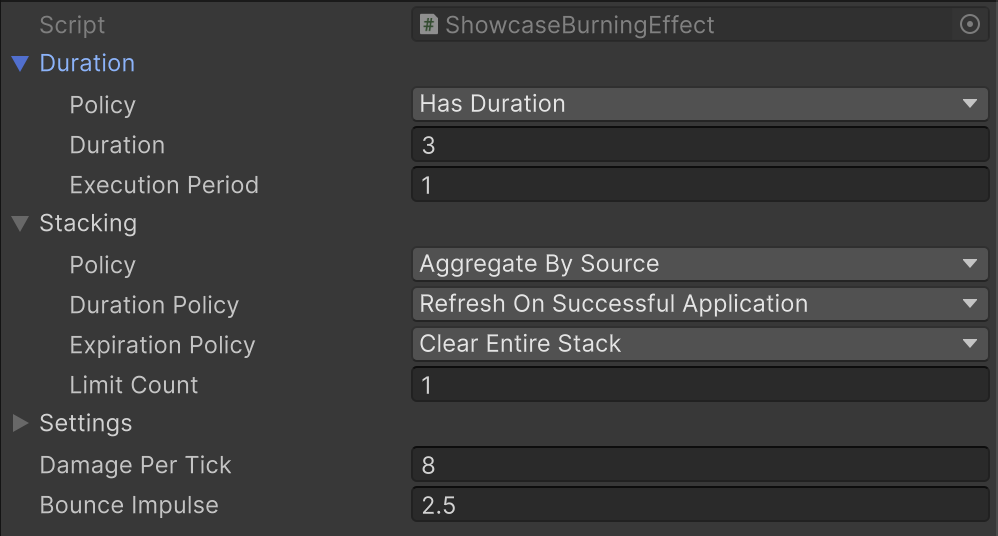
The asset uses a small subclass for behavior that cannot be expressed by attribute modifiers alone:
csharp
[CreateAssetMenu(menuName = "RedEngine/Showcase/Burning Effect")]
public sealed class ShowcaseBurningEffect : GameplayEffect
{
    [SerializeField, Min(0f)] private float damagePerTick = 8f;
    [SerializeField, Min(0f)] private float bounceImpulse = 2.5f;

    public override void Execute(AbilitySystemComponent target, in EffectContext context)
    {
        target.Attributes?.ApplyModifier(
            ShowcaseCharacter.HealthAttribute,
            ModifierOperation.Additive,
            -damagePerTick);

        if (target.Owner is ShowcaseCharacter character)
            character.Movement.AddImpulse(Vector3.up * bounceImpulse);
    }
}
State authority executes it three times, once per second. Damage changes replicated Health, while the movement impulse is applied through the character's simulation component. For a volume that should remain active indefinitely while occupied, call TryRefreshEffectDuration(effect, sourceObject) from ICharacterStayTrigger. This extends expiration without moving the periodic execution tick or adding another stack.
Apply an effect
csharp
var context = new EffectContext(
    instigator: source.Attributes,
    source: source.Attributes,
    location: new EffectLocation(
        origin: source.transform.position,
        hitPoint: hitPoint,
        hitNormal: hitNormal,
        direction: attackDirection));

EffectHandle handle = target.Effects.ApplyEffect(
    burningEffect,
    context,
    sourceObject: source.Object);
Retain the returned handle when the caller may remove a duration or infinite effect explicitly. Instant effects return an invalid handle because there is no active slot to remove.
Next: Gameplay Abilities.