
Appearance
Gameplay Abilities
A GameplayAbility is an asset-backed action with a replicated grant, an authority policy, activation checks, optional cost and cooldown policies, input binding, and tick-driven execution. Use it when an action must be granted or revoked dynamically, gated by tags, interrupted, or attached to equipment.
Ability lifecycle
An ability moves through this pipeline:
GrantAbilitycreates a replicated ability slot and callsOnGranted;- assigned input or game code calls
TryActivateAbility; CanActivatechecks active state, tag requirements, cooldown, and cost;CommitAbilityapplies the configured cost;Activateruns through the ability processor on Fusion ticks;- the coroutine finishes or is interrupted;
- the removal policy keeps or revokes the grant;
RevokeAbilityeventually callsOnRevoked.
Authoring settings
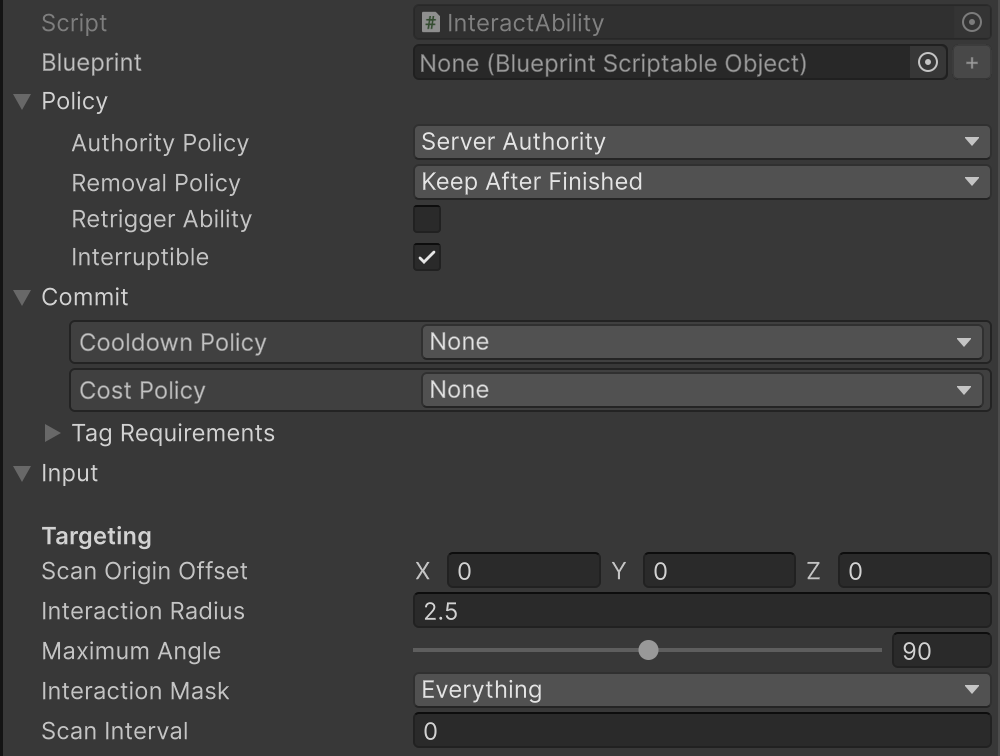
Policy
ServerAuthorityruns only on state authority.LocalPredictedcan also run for input authority and must remain safe under prediction and rollback.RetriggerAbilityallows activation while already active.Interruptiblecontrols whether external interruption is accepted.- removal policy decides whether the grant remains, disappears after completion, or cancels immediately when revoked.
Commit
TagRequirements blocks activation when required tags are absent or forbidden tags are present. DurationAbilityCooldown supplies a cooldown in seconds, evaluated against Fusion ticks. AttributeAbilityCostPolicy applies one or more instant gameplay effects after validating that every modifier can be paid.
Input
An ability can read a fixed NetworkInputTarget directly or use a typed AbilityInputTag binding. On the press edge, OnButtonPressed activates by default. On release, the ability can continue or request interruption through InterruptOnInputReleased.
Grant and activate
csharp
AbilityHandle dash = abilitySystem.GrantAbility(
    dashAbility,
    inputTag: "Ability.Movement.Dash",
    abilitySource: equipment.Object);

if (!abilitySystem.TryActivateAbility(dash, out var failure))
    hud.ShowAbilityFailure(failure);
Keep the handle when later code needs to activate, interrupt, or revoke that exact grant. Equipment can also revoke all abilities associated with its source object.
Use abilitySystem.IsAbilityActive<TGameplayAbility>() to read the replicated active state of an ability type. The Compact Showcase uses this to recover Stamina after sprint ends and to show its trail.
Extended example: reload ability
The weapon module demonstrates the full pattern. It resolves its source when granted, adds weapon-specific validation, waits using simulation ticks, and reacts to interruption.
csharp
public sealed class WeaponReloadAbility : GameplayAbility
{
    [NonSerialized] private Weapon? _weapon;

    public override void OnGranted(AbilityGrantContext context)
    {
        base.OnGranted(context);
        context.TryGetSource(out _weapon);
    }

    public override void OnRevoked(AbilityGrantContext context)
    {
        base.OnRevoked(context);
        _weapon = null;
    }

    public override bool CanActivate(
        in AbilityExecutionContext context,
        out AbilityFailureReason failure)
    {
        if (!_weapon)
        {
            failure = AbilityFailureReasons.InvalidSource;
            return false;
        }

        if (_weapon.IsReloading)
        {
            failure = WeaponAbilityFailureReasons.Reloading;
            return false;
        }

        if (_weapon.AmmoInMagazine >= _weapon.MagazineCapacity)
        {
            failure = WeaponAbilityFailureReasons.MagazineFull;
            return false;
        }

        if (_weapon.ReserveAmmo <= 0)
        {
            failure = WeaponAbilityFailureReasons.NoReserveAmmo;
            return false;
        }

        return base.CanActivate(context, out failure);
    }

    public override IEnumerator Activate(AbilityCoroutine context)
    {
        if (!_weapon || !_weapon.CanReload())
            yield break;

        _weapon.BeginReload();
        yield return new AbilityWaitSeconds(_weapon.CalculateReloadTime());

        if (context.Interrupted)
            _weapon.CancelReload();
        else
            _weapon.CompleteReload();
    }
}
Calling the base CanActivate after project checks preserves the common tag, cooldown, cost, and already-active rules.
Tick-driven coroutine tools
Ability routines are not Unity coroutines. DefaultAbilityProcessor advances them during FixedUpdateNetwork and supports:
AbilityWaitTicks;AbilityWaitSeconds, converted through the runner tick rate;AbilityWaitUntil, optionally with a tick-derived timeout;AbilityWaitInputReleased.
Use these yields for ordered ability work, but keep the authoritative result in networked gameplay state. Local coroutine position is not itself rollback state; predicted abilities must be able to reproduce their result when Fusion resimulates.
Failure handling and presentation
Override ActivationFailed for ability-specific feedback, or subscribe to OnAbilityActivateFailed. Presentation events should be emitted only on forward simulation; the component already gates its public events with Runner.IsForward.
PresentationBehaviour assets can attach pooled audio or particle feedback to an effect/ability result without making the presentation object authoritative. FeedbackParameters.Magnitude carries an optional numeric payload for presentations such as floating damage or healing values. For replicated PresentationManager.PlayFeedback, put the presentation prefab in an Addressables label mounted on every peer before playback. The editor synchronizes its network GUID from the prefab's Unity GUID. See Assets and content labels.
Next: Inventory · Equipment · Interaction.
Grant and activate immediately
GrantAbilityAndActivate(ability, triggerSource) returns whether activation succeeded and releases the new grant when activation fails. Successful grants follow the asset's removal policy; use RemoveWhenFinished for one-shot item actions. The trigger is available during validation and in AbilityCoroutine.Context. Item actions pass the selected ItemInstance as the trigger, then resolve the character's inventory or equipment from the ability system component.
ProcessSlotInput treats Started and Triggered as a press transition: repeated events while held do not attempt another activation. Route Canceled too, so the next press can activate again. Direct input bindings already detect press/release edges. Abilities that need continuous behavior (such as automatic fire or sprint) keep one running ability routine while the input is held. Weapon and interaction abilities apply the common active-state, tag, cooldown, and cost checks. Cooldown durations are measured in simulation seconds; a fresh grant has no initial cooldown.